Create a Kinematic Setup
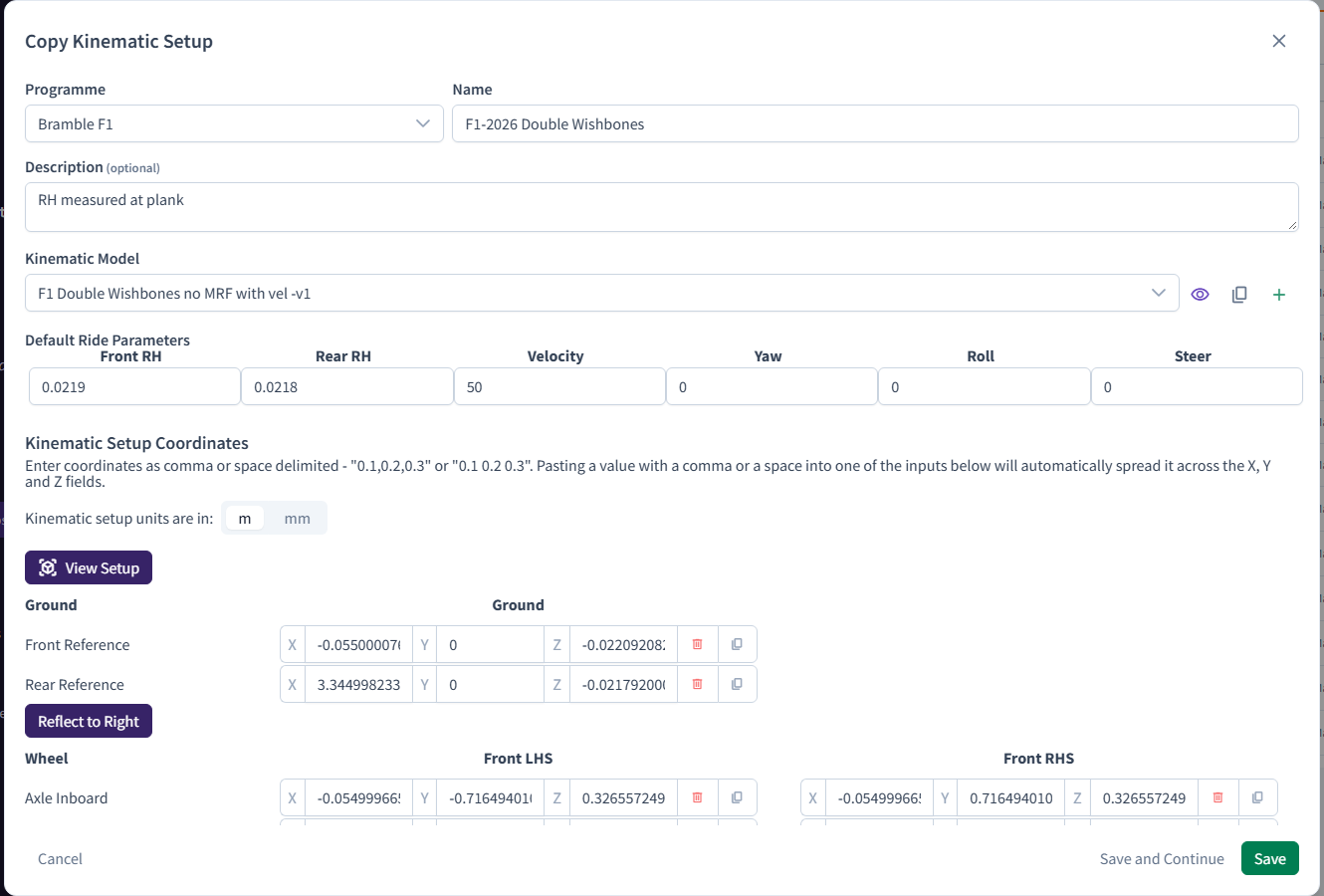
A Kinematic Setup sets a model's default parameters and the coordinate systems that position and move its Parts. It's based on a kinematic model, which defines what can move and how.
- In the sidebar, under Setup & CAD, click Kinematic Setups.
- Click New Kinematic Setup.
- In Create Kinematic Setup, choose the Programme and enter a Name (up to 100 characters), plus an optional Description.
- Choose the Kinematic Model. The buttons next to it let you edit the model, copy it, create a new one or delete it.
- Under Default Ride Parameters, enter a value for every parameter. These apply to any Attitude whose Map doesn't set its own value.
- Under Kinematic Setup Coordinates, enter each coordinate system the model needs:
- Use the units toggle to switch between metres and millimetres.
- For symmetric models, Reflect to Right fills in the right-hand side from the left.
- View Setup shows the coordinates on the model.
- Click Save, or Save and Continue to keep editing. "Form currently incomplete" means a required value is still missing.
Note
The kinematic models on your Account decide what you can configure. If you need a model you don't have, contact support@bramblecfd.com.
Related: Create a Map · Create a Run · Simulation configuration